If you’ve ever tried to go from “I need an API for X” to “here’s working code that calls it”, you know the painful parts: searching, skimming docs, figuring out auth, and then discovering your code doesn’t actually run.
I took the challenge to automate this loop using a small and practical agentic workflow based on langGraph:
- generate search keywords from a user task
- search the web for candidate docs/pages
- fetch and filter pages that likely contain a usable API
- generate runnable code using the selected pages
- execute the code as a validation step
- retry search if nothing works
The goal isn’t “a fully autonomous agent.” It’s a debuggable, extendable baseline you can build on.
Code: GitHub repo (link) → https://github.com/mamhamed/Agentic/blob/main/Agentic_learn_API.ipynb
The Task Template
The workflow is designed for a generic task template:
Task Template: Find an API that can solve
{task}, then write code using that API.
Example tasks:
- “I want to book flights. What APIs have a free tier, and how do I call them in Python?”
- “Find a free-tier API for hotel prices and write sample code.”
- “Find an API for housing sales data and show how to query it.”
The High-Level Flow
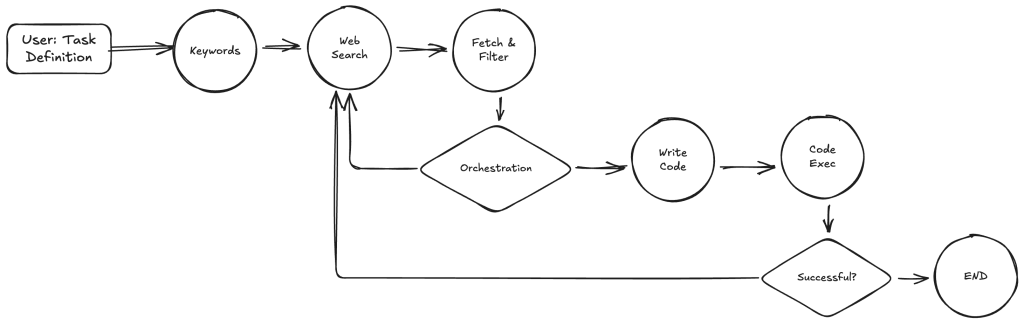
Here’s the flow I implemented using LangGraph:
- Task → Keywords: An LLM turns the user’s request into search-friendly keywords.
- Web Search: A search tool (Brave Search in my prototype) returns a batch of URLs.
- Fetch & Filter: The workflow fetches each URL, extracts the readable text, and asks an LLM: “Does this page contain an API I can use to solve the task?”
- Orchestration: A central router decides whether to keep searching or move forward.
- Write Code: If we have a promising page, an LLM generates Python code to call the API.
- Code Exec: The workflow executes the generated code. If it fails, we retry with the next search batch.
Conceptually, this turns “API discovery” into an iterative pipeline with an explicit success signal: the code actually runs.
Why a Graph (Not a Monolithic Agent)
This design intentionally uses a hard-coded DAG rather than a free-form planner. In other words:
- The “plan” is encoded in the graph structure (keywords → search → fetch/filter → code → exec).
- The “intelligence” is concentrated in a few places (keyword generation, relevance filtering, code generation).
- The “control” lives in an orchestrator node that decides what to do next based on state.
This makes the system:
- easier to debug (every node has a single responsibility)
- easier to extend (swap search provider, add better extraction, add scoring, etc.)
- less brittle than a single prompt trying to do everything end-to-end
The Nodes (What Each Agent Does)
1) Keywords Node
Takes the user task and produces search keywords. This helps keep search queries short and high-signal.
2) Search Node
Uses a web search API to retrieve a set of URLs (with pagination support). If the first batch doesn’t yield anything good, the system can request the next batch.
3) Fetch & Filter Node
For each URL:
- fetch HTML
- strip scripts/styles
- extract text from the main content region
- run a lightweight LLM filter: “YES/NO — is this page likely to contain a usable API for the task?”
The output is a list of pages annotated with good_page.
4) Orchestrator Node
Implements the routing policy:
- If any page looks good → go to code generation
- If none look good → go back to search and try another batch
- If there’s nothing to process → end
5) Code Node
Reads the relevant page content and generates Python code. I constrain the model to return JSON:
{ "language": "python", "code": "...", "note": "..." }
This makes parsing and evaluation much more reliable.
6) Code Exec Node
Executes the model-generated code. If it succeeds, we’re done. If it fails, we treat that as a strong negative signal and retry search.
This “execute-to-validate” step is the key difference between “LLM demo code” and “code you can actually run.”
What Works Well
- Simple and effective retry loop: If the web results are bad (no API info, not free, etc), the workflow keeps searching.
- Grounded code generation: Code is generated from specific page content (docs/pricing/examples).
- Concrete success metric: Code execution provides a real validation step.
Summary
This workflow is a compact baseline for an agent that can:
- discover APIs on the web,
- write code to call them,
- and validate that code via execution,
- with a clean loop and clear decision points.
If you want a minimal starting point for agentic systems that are debuggable and practical, this is a good place to begin.
Code: GitHub repo (link) → https://github.com/mamhamed/Agentic/blob/main/Agentic_learn_API.ipynb